Convenient, easy payments thanks to QR bills
In 2020, the QR bill was rolled out across Switzerland. All the payment information is contained in the QR code. Simply scan the code, generate the invoice, and that's it.
Benefits of QR bills
- Simply scan the QR code to access all the billing information.
- You don't have to manually type in the account and reference numbers.
- It takes just one click to make the payment.
What does a QR bill payment slip look like?
A QR bill is split into two parts: the receipt slip (1) and the payment part (2).
The “Swiss QR code” (3) contains all the information required for invoicing and payment.
You can use the perforation (4) to detach the payment part and receipt slip from the bill and then pay at a post office or send a payment order to your bank.

More information from SIX can be found here or as a PDF to download.
How do I pay a QR bill?
- Via the VZ Financial Portal mobile app (three options):
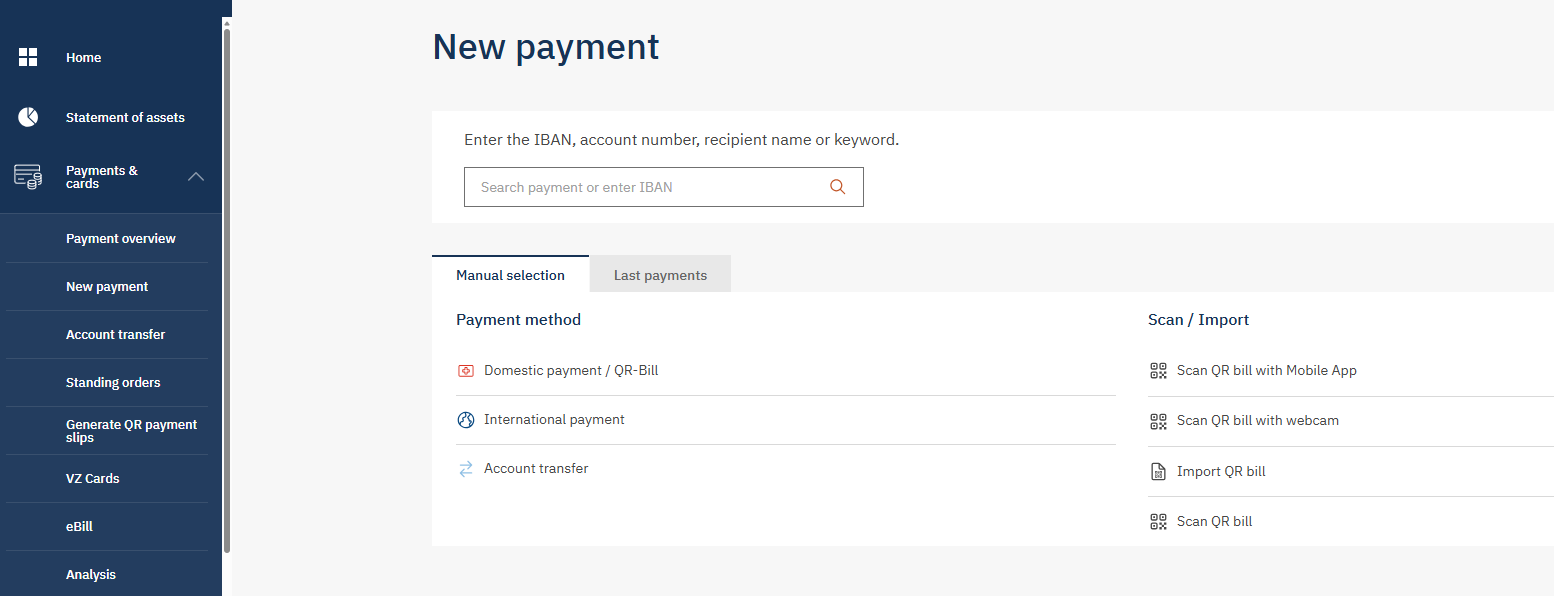
- Scan the QR code (Payments & cards > Scan payment) and then initiate the payment by clicking in the app or on your desktop.
- Scan the QR bill electronically in PDF format (Payments & cards > New payment > Manual selection > Import QR bill) and initiate the payment.
- Enter the QR bill manually (Payments & cards > New payment > Manual selection > Domestic payment / QR bill) and initiate the payment.
- Via VZ Financial Portal e-banking (three options):
- Scan the QR bill using a QR reader, e.g. PayEye or PayPen, (Payments & cards > New payment > Manual selection > scan the payment slip) and initiate the payment.
- Scan the QR code electronically in PDF format (Payments & cards > New payment > Manual selection > Import QR bill) and initiate the payment.
- Enter the QR bill manually (Payments & cards > New payment > Manual selection > Domestic payment / QR bill) and initiate the payment.
- Via a VZ multi-payment order: Complete the written order form, enclose the outstanding QR bills and send everything to VZ Depository Bank.
- At the post office counter: The QR bill can also be paid directly at any post office counter.
VZ multi-payment orders can be ordered from your client advisor or our helpdesk on 058 411 88 88 (Mon-Fri, 8 a.m. to 6 p.m.).
For billers: If you use business software for your payment transactions, carry out the latest update. This will make sure that your QR bills can be paid.
How do I create a QR bill in the VZ Financial Portal?
You can easily create QR bills with just a few clicks in the VZ Financial Portal:
- Log in to the VZ Financial Portal on your computer.
- Navigate to "Payments & cards" on the left-hand side and then to "Generate QR payment slips".
- Under "Credit account", select the account for which you wish to create a QR bill.
- You can provide further billing information under "Payment details".
- Click on "Create". You can now download the QR bill as a PDF file.

Get to know our offerings
-
We'll contact you
Contact

-
We'll contact you
Contact
-
Stay up to date
Newsletter