Equity search with theScreener
Find the shares that suit your strategy
theScreener's equity search tool enables you to search through more than 6,500 shares worldwide to find the ones that best suit your investment strategy. Filter by sector, market, dividend yield and other criteria. theScreener's general impression shows you how a share is currently assessed. The risks, opportunities and market environment are clearly summarised. Register for free, and compare securities even more easily.
Additional offers
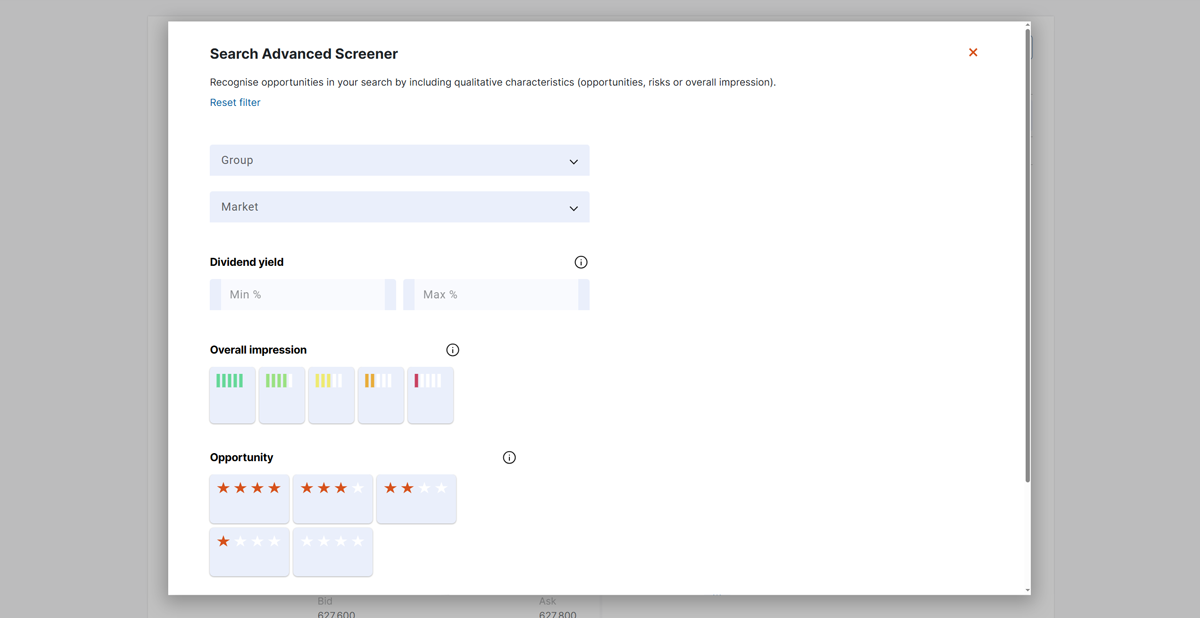
Thanks to theScreener, you can filter specifically for risks and opportunities.
- The opportunity rating assesses a share based on analyst signals, price potential, the technical trend and relative performance (0 to 4 stars).
- The sensitivity (risk) indicates how strongly a share reacts to negative market phases or bad news about the company (low, neutral or high).
The service is free of charge. Register using your email address
Do you have any questions about equity searches?
-
What criteria can I use to filter shares?
You can filter shares by sector, market, expected dividend yield and valuation (general impression, risks and opportunities).
-
What does the opportunity rating mean?
The opportunity rating assesses a share's potential on a scale of 0 to 4 stars. It's based on analyst signals, price potential, the technical trend and relative performance.
-
What does the sensitivity (risk) tell me?
The sensitivity indicates how strongly a share reacts to negative market phases or bad news about the company. It's divided into three levels: low, neutral and high.
-
What does the general impression mean?
The general impression summarises the risks, the opportunities and the market environment as a whole. This allows you to see at a glance how a share is viewed overall.
-
How do equity searches help me?
Equity searches help you find specific shares that suit your strategy – for example, shares with high potential or a balanced risk profile.
-
Free first meeting
Appointment


-
VZ Financial Portal
Offer

-
We'll contact you
Contact